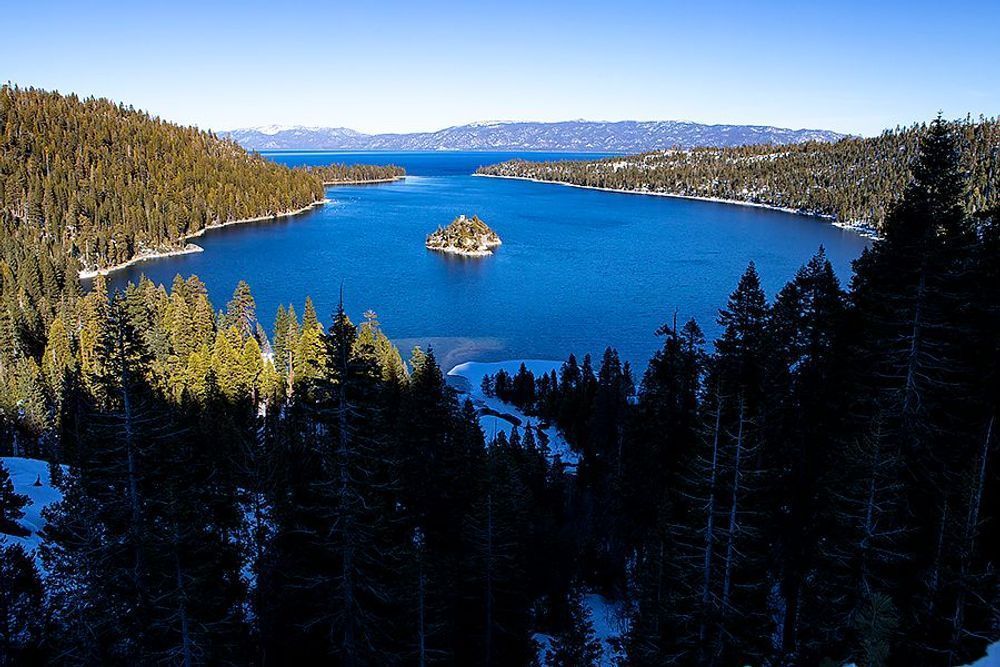
Large winter landscapes can overwhelm a photograph with detail: snow on every branch, dark forest across the slopes and changing reflections on the water. A small island offers a useful anchor, giving the eye somewhere to arrive before exploring the wider scene.
Let the shoreline introduce the subject
Look for a curve or diagonal that leads toward the island. It need not point directly at it; a shoreline can establish the space around the subject and make its position feel intentional. Compare a few camera heights to see how foreground snow overlaps the water.
Neal Nachman’s Emerald Winter places Lake Tahoe’s island within a larger arrangement of blue water, forest and snow. The relationship between the small central landform and its surroundings makes the scale legible.
Protect separation between the layers
Watch where the island meets the distant shoreline. If their tones merge, a different viewpoint or a modest adjustment in framing may produce a clearer relationship. During editing, first compare the brightness of the island, water and background together. Strong local contrast everywhere can make the layers compete instead of separate.
Snow should retain useful variation, but not every white patch must reveal the same amount of texture. Check the histogram and bright areas while deciding which surfaces need detail. Avoid darkening an entire landscape simply to recover an insignificant reflection.
Choose the crop by the space it preserves
A tighter crop makes the island larger, but may remove the shoreline that explains the scene. Create two versions and view them at the same display size. Ask which one makes the location feel more complete rather than which shows the most pixels in the subject.
Leave the final image for a short interval, then return to it without zooming in. If your eye finds the island naturally and then moves through the surrounding landscape, the composition is doing its work. An expansive scene can remain spacious while still giving the viewer a clear point of orientation.